The Boring Edges of Userscript Hot Reload
I made a small Node tool called userscript-hot-reload.
The idea is nothing new: serve the rebuilt userscript from localhost, have an installed loader fetch it, then eval the new version when the file changes.
That part worked quickly. However, the part that turned it into a working tool was the boring edge work around it: userscript metadata, strict CSPs, stale long-polls, refreshes, old dev servers, and old JS left on the page between reloads.
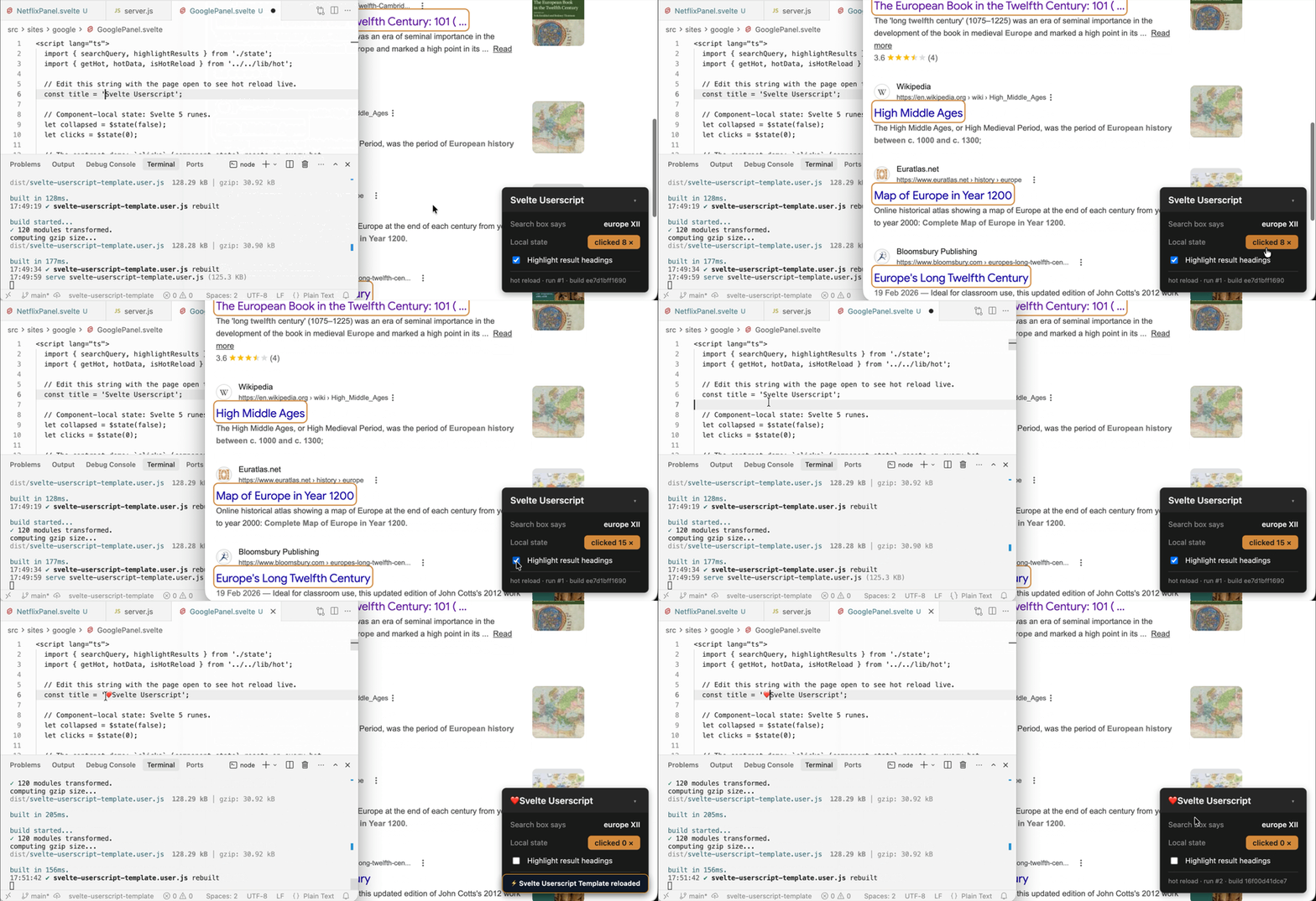
The happy path looks like this:
You run it from the userscript project:
npx userscript-hot-reloadIt looks for built *.user.js files in the usual output folders, reads the userscript metadata block, and serves a loader for each script. That loader is the thing you install in Tampermonkey or Violentmonkey during development.
A Userscript That Loads the Userscript
The loader is a normal userscript, but it is not the real script. It is a small wrapper generated from the real script’s metadata.
That part matters because the loader needs to run in the same places as the script it is standing in for. So it copies the useful bits from the built file: @match, @include, @exclude, @grant, @connect, @require, @resource, @run-at, and @noframes.
Once installed, it does three things:
- fetch the real built script from
http://127.0.0.1:8765 - execute it on the page
- keep asking the dev server whether that exact version has changed
The update request is just a long poll:
GET /my-script.user.js?on-update&v=<current-content-hash>The branch is intentionally plain:
There is no module graph and no clever runtime patching. The old run gets a chance to clean up, and then the new script runs again.
Versioning by Content
The server versions each built userscript by hashing its contents.
That means a rebuild that writes the same output does not reload the page code for no reason.
The watcher also watches directories, not individual files. That is to account for atomic writes, where the build tool writes a temporary file, then renames it over the old output.
The Single-Connection Surprise
The first long-poll version held each request open for minutes.
At a first glance, it makes sense: fewer requests, less noise etc., but the behavior was wrong in practice. In the privileged path, those requests are GM.xmlHttpRequest, not normal page fetches. With a few tabs open, I saw new pages sit there without the userscript UI. Triggering a hot reload made the missing run appear.
The dev-server logs made the shape clearer. In Tampermonkey on Chromium, every tab’s GM.xmlHttpRequest to the dev server appeared to go through one shared connection 🥲. Not the browser’s normal “a few requests per origin” pool.
So if Tab A was holding a long-poll, Tab B’s initial “give me the script” request waited behind it. Editing a file resolved the held poll early, freed the connection, and the queued tab finally loaded.
So the current version does two things:
- keep the long-poll hold short, currently
1000ms - abort the active request on
pagehide, then stop the polling loop
The timeout is not just a timeout anymore. For this transport, it is also the maximum time another tab should have to wait for the shared connection. pagehide still matters for refreshes and closed tabs, but it does not solve the case where another tab is alive and legitimately polling. The short hold does.
Edits still reload immediately because a save resolves any waiting poll.
When localhost Is Not Just localhost
The first version of this in my head was just fetch() from the page to localhost.
That version is fast. It uses the browser’s normal connection pool, so it does not have the single-connection GM.xmlHttpRequest behavior above.
It also has two catches. A strict Content-Security-Policy can block page-context requests to localhost. And in Chrome, the first localhost request from a real page can trigger a local-network permission prompt: the site “wants to access other apps and services on this device.” 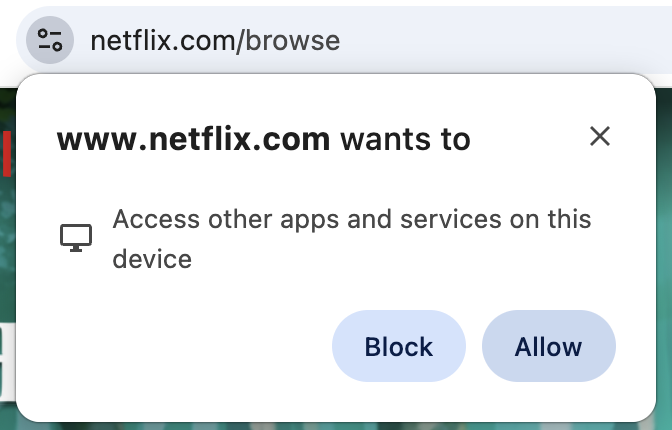
So the loader now treats transport as a development choice:
The default is GM.xmlHttpRequest. The generated loader adds the needed @grant GM.xmlHttpRequest and @connect localhost / @connect 127.0.0.1, then asks the userscript manager to make the request instead of the page. That can bypass the page’s CSP in the setups this tool targets, which makes it the safer default.
In tool fetch can be enabled by a parameter:
npx userscript-hot-reload --fetchor set useGmFetch: false globally or per script.
Running Again Leaves Stuff Behind
Worth noting that it’s still JS running on a page. Re-executing a userscript does not magically undo whatever the previous run did.
If the script appended a panel, started an interval, added a listener, or created a MutationObserver, the next run needs to clean that up. The loader exposes a tiny hot context for that:
const hot = window.__USERSCRIPT_HOT_RELOAD_CURRENT__ ?? null;

const panel = document.createElement('div');
document.body.appendChild(panel);

const interval = setInterval(tick, 1000);

hot?.onDispose(() => {
  panel.remove();
  clearInterval(interval);
});
That is the part that makes this feel different from just re-fetching and evaluating a file. The reload loop is small, but the script still needs a way to be polite to its previous self.
There are older versions of this idea that use long-polling too, including Tampermonkey-Hot-Reload and this note on live reloading Tampermonkey scripts. There are also more complete build pipelines like vite-plugin-monkey and webpack-monkey if you’re ok shaping the whole project around userscript development rather than having a flexible drop-in.